Any cell can hold a formula. Start with = and reference other rows by account number or name, drivers, groupings, and periods. The grid recalculates every dependent cell when you save.
Quick examples
=4000! * 0.38                 COGS at 38% of Sales Revenue, same month
=[Headcount] * [Avg Monthly Comp]   two drivers multiplied
=(4000! + 4100!) * 0.025      2.5% of two revenue accounts
=[M-1] * 1.03                 3% growth on the previous month, same row
=ACTUAL([M-12]) * 1.1         10% over the same month last year, from posted actuals
=IF(Headcount > 15, 9000, 6000)
References
| Form | Example | Meaning |
|---|---|---|
| Period only | =Jan, =Q1, =FY, =[M-1] | Same row, that period |
| Period range | =Jan:Mar | Same row, summed across the range |
| Account number ! period | =4000!Jan | That account, that month |
| Account name ! period | =Revenue!Q1, =[Sales Revenue]!Jan | Brackets when the name has spaces or punctuation |
| Account, current period | =4000! | The same month as the cell you are in. A bare number without ! is just a number |
| Driver | =Headcount, =[Avg Price] | This cell's month |
| Driver ! period | =Headcount!FY | Annual total of the driver |
| Grouping | =[Total Revenue], =[Gross Profit] | This cell's month |
| Dimension-scoped | =4000@Retail!May, =6000@self!Jun | One dimension only; @self means the dimension of the current row |
A bare account name without a period, such as=Revenue, evaluates to the full-year sum. Bare driver and grouping names evaluate to the current month. Add!and a period to be explicit.
Periods
- Month names
Jan…Decmatch the first occurrence of that month in the plan window. - Quarters
Q1…Q4andFYcover the plan window. - Index
M1,M2, … counts months from the start of the plan. - Relative offsets
[M-1],[M+3],[M-12]move from the cell's own column. They stay correct when you copy the formula across months. - Calendar-absolute
[Jan-2026],[2026-01],[2026-Q1]pin a specific month regardless of the plan window.
If a relative offset lands before the plan window on an account row, the grid reads posted actuals for that month. Drivers have no actuals, so the same formula on a driver row errors.
Operators and functions
Use + - * / and ^, parentheses, and comparisons =, !=, <, >, <=, >= (which return 1 or 0).
| Function | Purpose |
|---|---|
SUM(a, b, …) | Sum a list or range |
AVG(…), MIN(…), MAX(…) | Average, minimum, maximum |
IF(condition, if_true, if_false) | Branch on a comparison |
ROUND(value, digits) | Round; digits is optional |
ABS(value) | Absolute value |
ACTUAL(Revenue!Q1), ACTUAL([M-12]), ACTUAL(Jan) | Read from posted actuals instead of the plan |
ACTUAL() reads the actuals as they are when you save the formula. If you import new GL data later, re-save the cell to pick it up.
Autocomplete
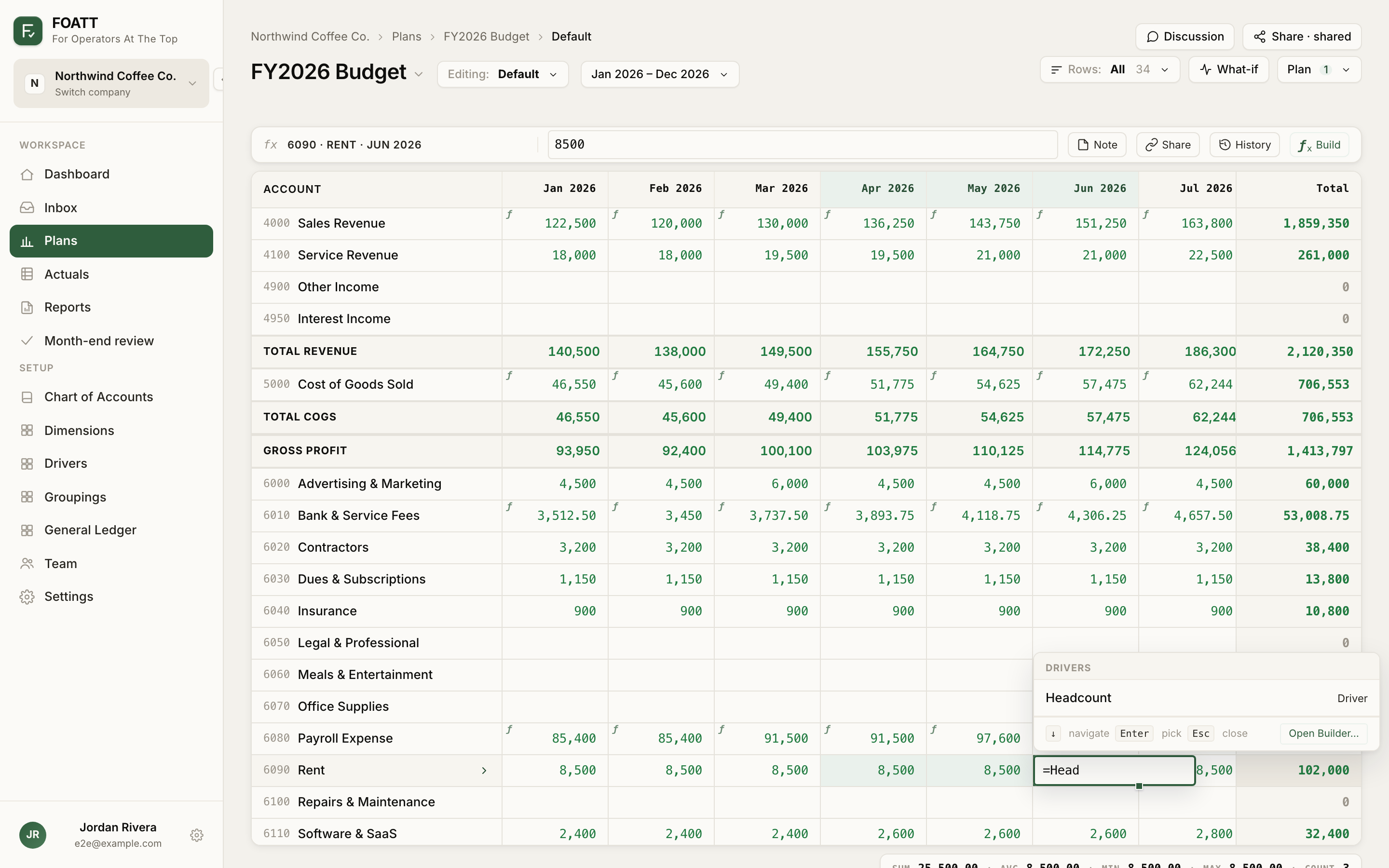
Once you type =, a popover suggests functions, relative offsets, periods, accounts, and drivers as you type. Press the down arrow to move into the list, Enter or Tab to pick, and Escape to close. Picking an account or driver inserts a complete reference such as 4000![M+0]. After a !, only periods are offered.
While a formula is open you can also click another cell to insert its reference. Clicking a cell in the same row inserts just the period; another row inserts account!period. Hold Cmd or Alt while clicking to insert a relative offset instead.
The formula builder
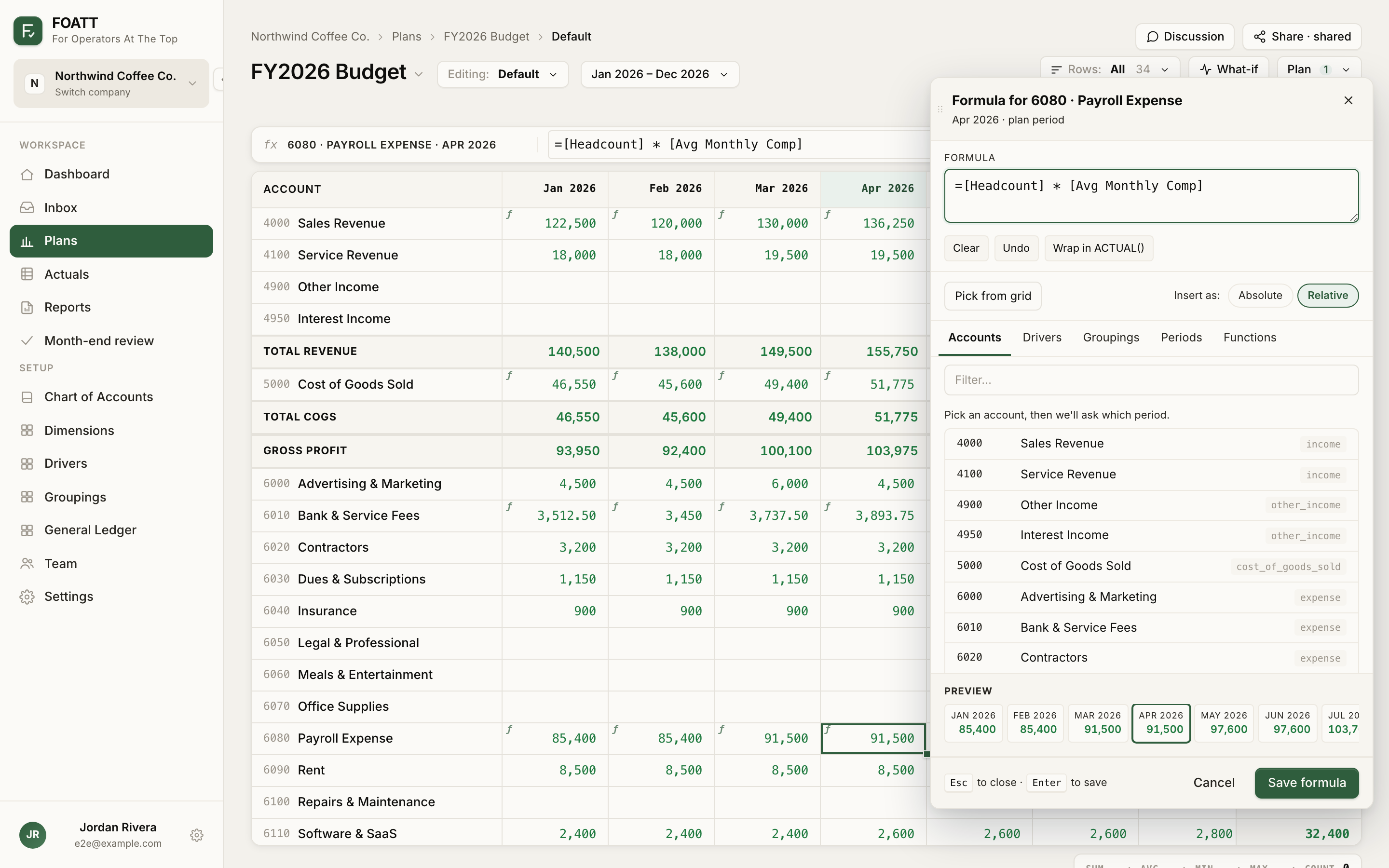
Open the builder with Build in the formula bar, Cmd/Ctrl + Shift + F, or by pressing Enter on a cell that already holds a formula. Typing = into an empty cell opens it too. It has tabs for Accounts, Drivers, Groupings, Periods, and Functions, a Preview that evaluates the formula across every period, and an Insert as toggle: Relative references such as 4000![M-1] stay correct when copied across months; Absolute references such as 4000!Jan are fixed. Click Save formula or press Enter to commit.
Errors and circular references
A cell that cannot be calculated shows an error state, and its tooltip carries the reason: an unknown account or driver, an ambiguous name, an unknown period, division by zero, or a function with the wrong number of arguments. Formulas that depend on each other in a loop are marked circular reference. Fix one cell in the loop and the rest recalculate.
Right-click a cell and choose Trace precedents to see every cell it reads, or Trace dependents to see every cell that reads it.